
The free checkbook register that works like your paper one
Write each check, deposit and card purchase into a familiar register. The running balance updates as you go, you tick entries as they clear, and once a month you reconcile with your bank statement to the penny. No subscription, no account, nothing leaves your PC.
On a Mac, Chromebook or phone? The web edition works in your browser; the Store app is for Windows PCs.
- Free forever edition
- Pro is $7.99 once, not a subscription
- Works offline
- No bank passwords
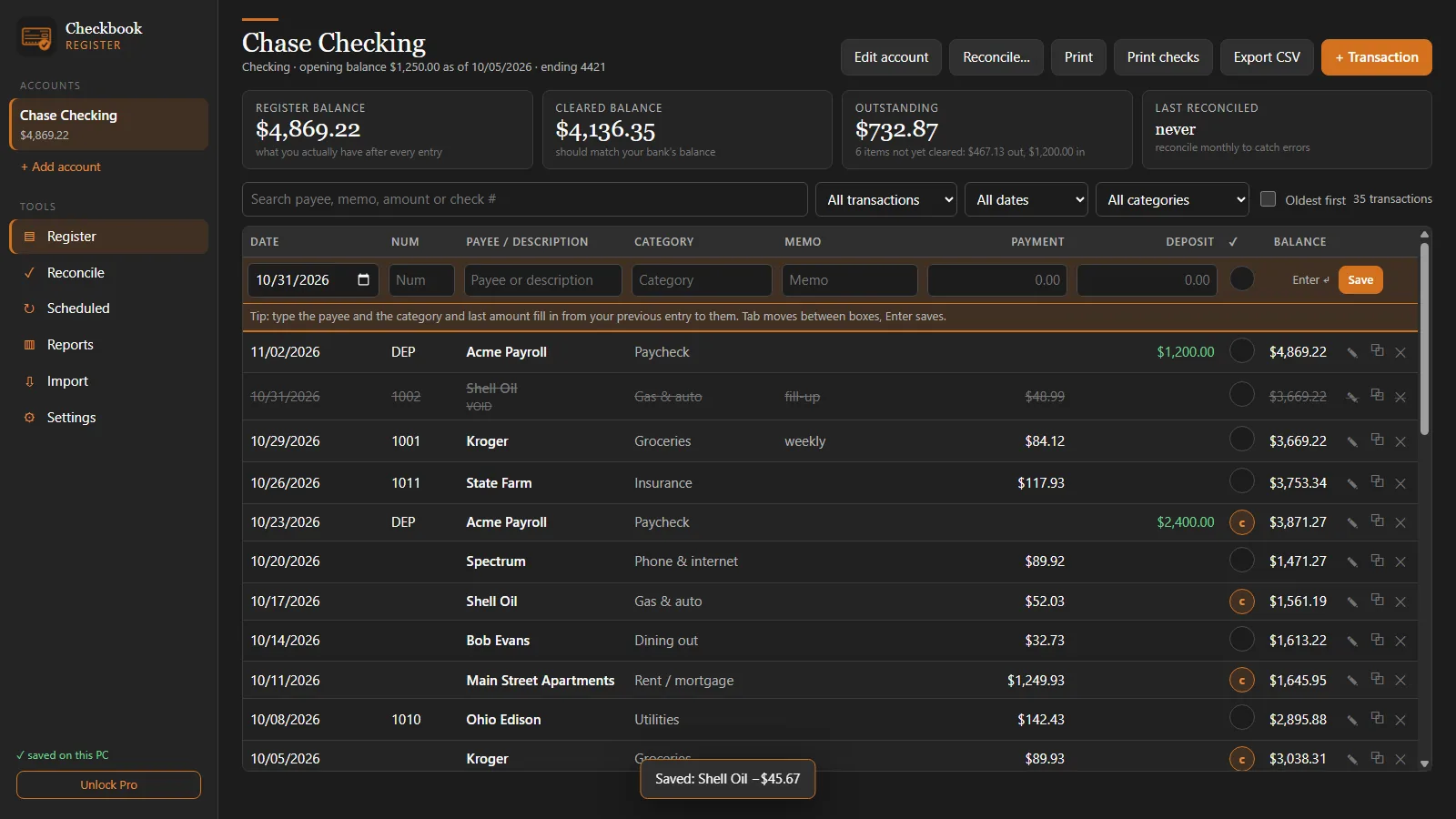
Everything a checkbook register should do, nothing it shouldn't
Checkbook Register is for people who want to know exactly what's in checking, not a budgeting coach or an investment dashboard. If you miss the simple register in Microsoft Money or the old one-time-purchase Quicken, this is that, rebuilt for Windows 10 and 11.
A register that feels like paper
Date, check number, payee, category, memo, payment, deposit. Tab between boxes and press Enter to save. The running balance is always right.
Cleared and reconciled marks
Click once for cleared (c), and reconciling marks entries R. Your register balance, cleared balance and outstanding items stay in view.
Reconcile in minutes
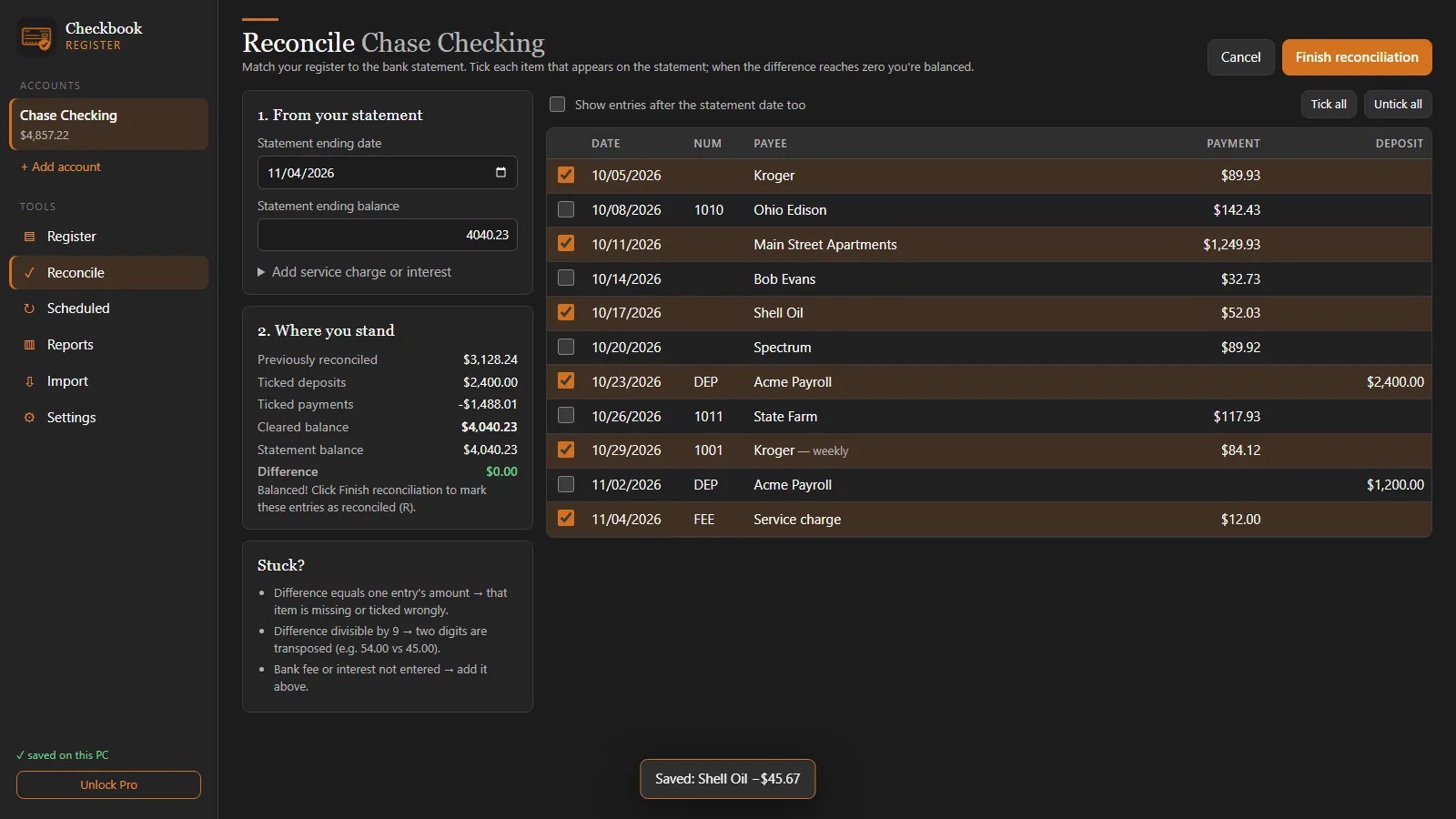
Enter the statement's ending balance, tick what's on it, and watch the difference reach $0.00. It tells you which way to look when it doesn't.
It remembers for you
Type a payee and the category and last amount fill in. The next check number is already there.
Find any entry
Search by payee, memo, amount or check number, then filter by status, date range or category.
Print and export
Print a clean register for your records or export it to CSV for Excel. Large-text and light "paper" themes make it easy on the eyes.
Balance your checkbook against the bank statement
Reconciling is the step that turns a list of numbers into a balance you can trust. Checkbook Register shows the statement balance, your cleared total and the difference live as you tick each item. Add a service charge or interest without leaving the page, then finish to lock the month in.
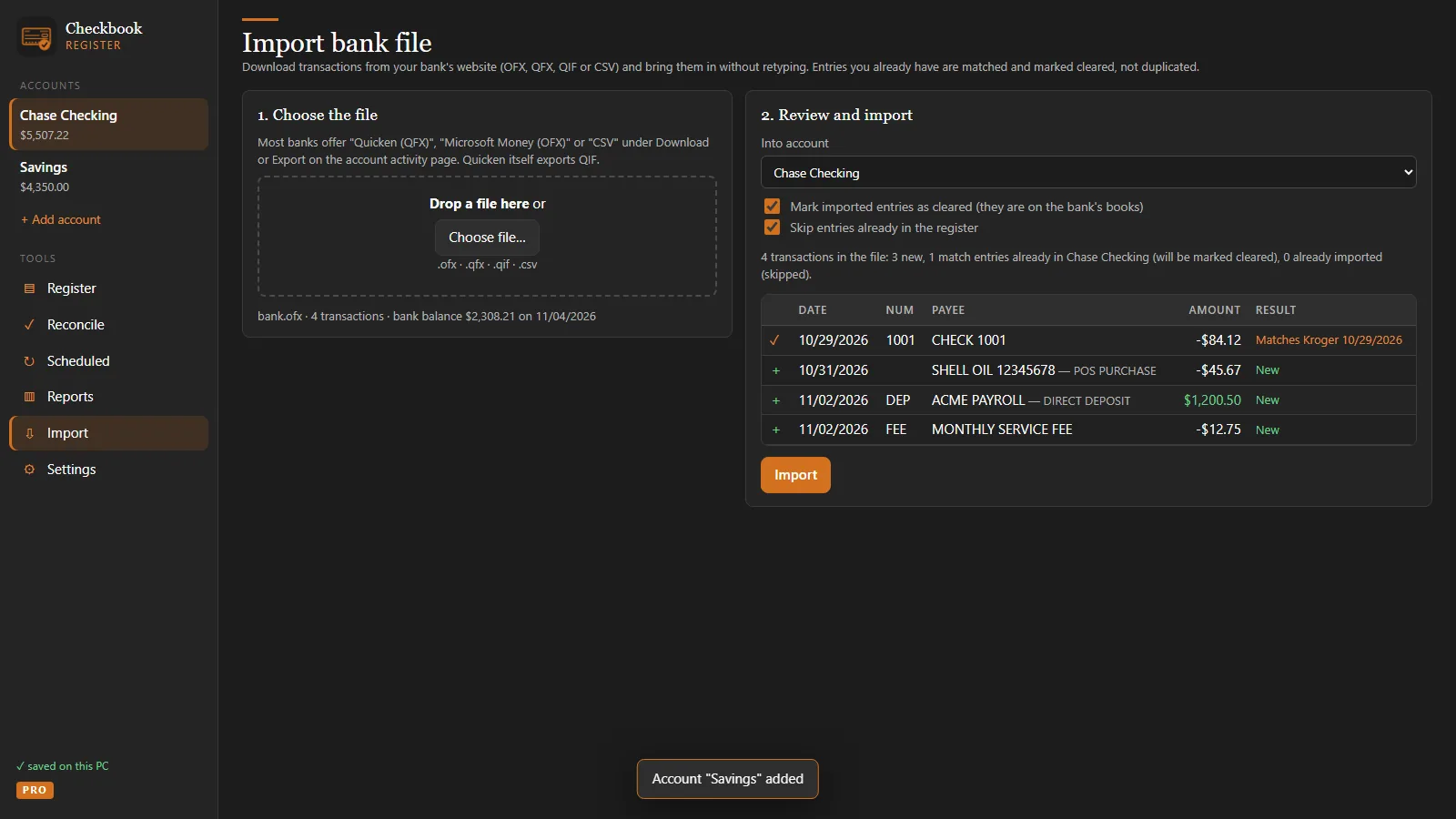
Import your bank's QFX, OFX, QIF or CSV file PRO
Download transactions from your bank's website and import them without retyping. Entries you already wrote down are matched and marked cleared instead of duplicated. The app never connects to your bank and never asks for a bank password.
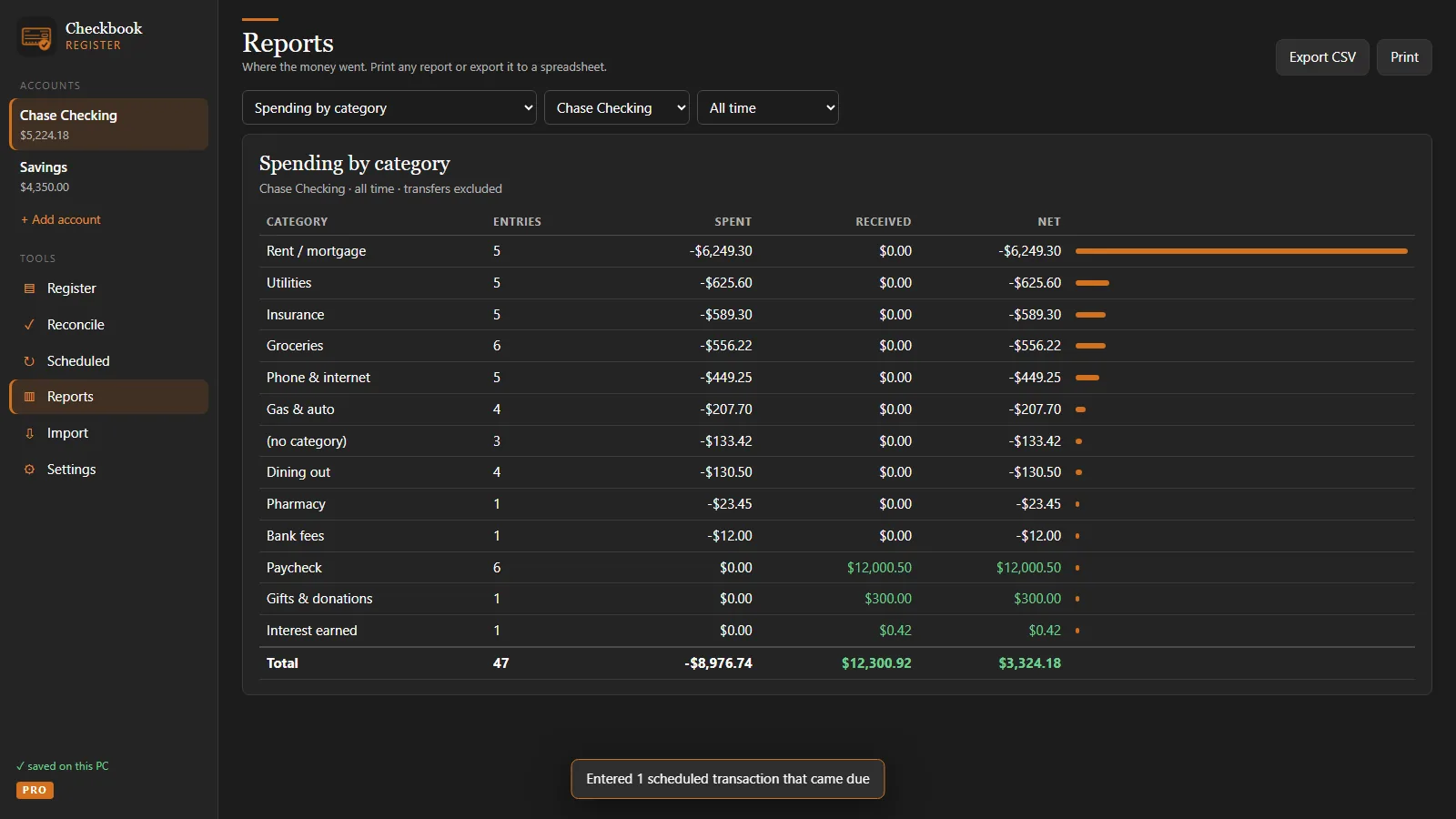
Reports and scheduled bills PRO
See income against spending by month, totals by category and by payee, and a check log that flags gaps in your check numbers. Schedule rent, paychecks and insurance once; the app reminds you when they're due and enters them in one click.
Free to use. Pro is $7.99, once.
Start free and keep it free for as long as you like. When you want more accounts, bank-file import or check printing, unlock Pro inside the Windows app with a single Microsoft Store purchase that works on every PC signed in to your Microsoft account.
| Feature | Free | Pro $7.99 once |
|---|---|---|
| Register with running balance, unlimited transactions | ✓ | ✓ |
| Cleared and reconciled marks, voids | ✓ | ✓ |
| Bank statement reconciliation | ✓ | ✓ |
| Search, filters, print, CSV export | ✓ | ✓ |
| Backup and restore | ✓ | ✓ plus encrypted backups |
| Accounts | 1 | Unlimited, with transfers |
| Import OFX, QFX, QIF and CSV bank files | — | ✓ |
| Scheduled transactions with reminders | — | ✓ |
| Reports and check log | — | ✓ |
| Print checks on 3-per-page check stock | — | ✓ |
| Password lock | — | ✓ |
US$7.99 in the United States; the Microsoft Store shows your local price. Pro is purchased inside the Windows app, not in the web edition.
How it works
Install or open
Get the free Windows app from the Microsoft Store, or try it right here in your browser. No sign-up.
Enter your balance
Name your checking account and type today's balance. That's the whole setup.
Write it down as you spend
Add each check, deposit and card purchase. The running balance shows what you really have.
Reconcile monthly
When the statement arrives, tick what cleared until the difference is zero.
Private by design
No account, no cloud, no ads, no analytics. Your register is stored only on your PC. Save a backup file with one click and restore it anywhere. Privacy policy.
Windows app or web edition
The Microsoft Store app runs in its own window, works offline and is where Pro is unlocked. The free web edition runs in any modern browser on any computer. Move between them with a backup file.
Made by a small developer
Checkbook Register is made by Macon Apps, which builds simple, one-time-purchase utilities for Windows. Questions go to a real person: jj@maconapps.com.
Checkbook guides
Plain-English help for keeping a checkbook, whether you use paper, a spreadsheet or this app.
How to balance a checkbook
Seven steps, a worked example, and how to track down a difference.
Read the guide →How to reconcile a bank statement
The monthly checklist and the formula that proves your balance.
Read the guide →Free printable check register
A blank register page to print or save as PDF.
Print it →A simple Quicken alternative
For people who only used Quicken as a checkbook.
Read more →Microsoft Money replacement
Get back a simple register on Windows 11.
Read more →Open QFX, OFX and QIF files
What bank download files are and how to open them.
Read the guide →Questions
Is Checkbook Register really free?
Yes. The free edition never expires and has no limits on transactions: one account, the full register with running balance, cleared and reconciled marks, bank statement reconciliation, search, printing, CSV export and backups. Pro is an optional one-time upgrade.
What does Pro cost, and is it a subscription?
Pro is a single in-app purchase of US$7.99 through the Microsoft Store (local prices vary by country). It is not a subscription: you buy it once and keep it, on every Windows PC signed in to your Microsoft account.
What does Pro add?
Unlimited accounts (checking, savings, credit cards, cash) with transfers, importing OFX, QFX, QIF and CSV files from your bank, scheduled transactions with reminders, reports by month, category and payee, a check log, printing checks on 3-per-page check stock, a password lock and encrypted backups.
Does it connect to my bank?
No. Checkbook Register never asks for bank passwords and never connects to your bank. You type entries as you go, or (in Pro) import the transaction file you download from your bank's website.
Where is my data stored?
Only on your own computer, in the app's local storage. Nothing is uploaded: there is no account, no cloud, no ads and no analytics. Save a backup file whenever you like and restore it on any PC.
Can I use it on a Mac, Chromebook or phone?
Yes, the free web edition runs in any modern browser, including Safari, Chrome, Edge and Firefox. The Microsoft Store app and the Pro upgrade are for Windows 10 and Windows 11.
How do I move from the web edition to the Windows app?
In the web edition open Settings and choose Save backup file. Install Checkbook Register from the Microsoft Store, open Settings and choose Restore from backup. Every account and entry comes across.
Does it work offline?
Yes. After the first visit the app is stored on your PC and works without an internet connection.
Know what's in checking, to the penny
Free download for Windows 10 and 11. Pro is a one-time $7.99 upgrade.
On a Mac, Chromebook or phone? The web edition works in your browser; the Store app is for Windows PCs.