
- Checkbook Register
- How to reconcile a bank statement
How to reconcile a bank statement
Updated November 5, 2026 · Macon Apps
Reconciling a bank statement means accounting for every difference between your records and the bank's until both arrive at the same balance. Here is the formula, a monthly checklist you can follow every time, and what to do when the numbers won't agree.
Cleared, outstanding and reconciled
| Term | Meaning |
|---|---|
| Cleared (c) | The bank has processed it: it appears on the statement or in online banking. |
| Outstanding | In your register but not yet processed by the bank: an uncashed check, a recent card purchase, a payment still pending. |
| Deposit in transit | A deposit you made after the statement's closing date, so it isn't on this statement. |
| Reconciled (R) | Cleared and confirmed against a statement that balanced. Reconciled entries shouldn't be changed afterwards. |
The reconciliation formula
Statement ending balance
+ deposits in transit
− outstanding checks and withdrawals
= adjusted bank balance
The adjusted bank balance must equal your register balance after you've recorded everything the statement shows that you hadn't recorded: service charges, fees, interest and any automatic payments you missed. When the two numbers are equal, the statement is reconciled. There's a full worked example in how to balance a checkbook.
Monthly checklist
- Get the statement and note its closing date and ending balance.
- Confirm last month was reconciled. The statement's beginning balance should equal last month's ending balance.
- Tick each deposit on the statement against your register.
- Tick each check, card purchase, ATM withdrawal, transfer and automatic payment.
- Record any fees, interest and missed transactions from the statement in your register.
- Add up the unticked register entries dated on or before the closing date: deposits in transit and outstanding withdrawals.
- Apply the formula above and compare with your register balance.
- When it matches, mark the ticked entries reconciled and note the statement date.
- Look over the outstanding list. A check outstanding for more than a couple of months is worth a call to the payee.
Keep the habit monthly. Reconciling three months at once is not three times harder, it's much harder, because errors overlap and fees pile up.
If the reconciliation is off
- Difference equals one entry: it was missed on one side, or ticked when it hasn't cleared.
- Difference is twice an entry: a payment was entered as a deposit or the reverse.
- Difference divisible by 9: transposed digits, such as $72.10 entered as $27.10.
- Off by exactly last month's difference: last month never balanced. Reconcile it first.
- Duplicate entries: common after importing a bank file on top of entries you typed by hand. A good register app matches these for you.
Never "fix" a reconciliation by adding an adjustment you can't explain unless the amount is a few cents and you've looked properly. Small unexplained adjustments hide the errors you're trying to catch.
Reconciling in Checkbook Register
- Open the account and choose Reconcile….
- Type the statement's ending balance and statement date.
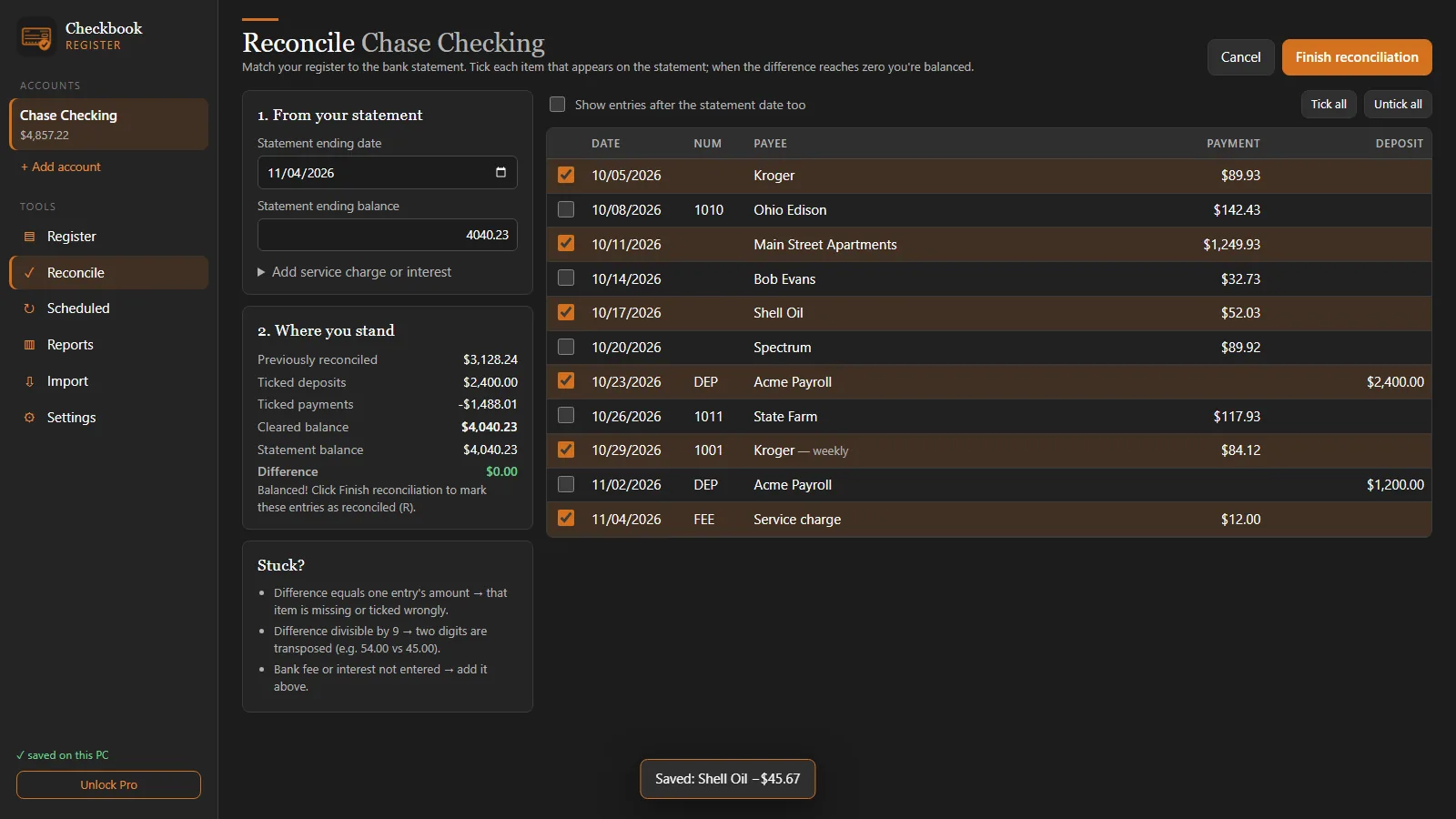
- Tick the entries that appear on the statement. The cleared balance and the difference update with every tick, and the app tells you whether you're looking for a missing payment or a missing deposit.
- Add a service charge or interest right on that screen if the statement shows one.
- When the difference is $0.00, choose Finish reconciliation. Every ticked entry is marked R and the statement is recorded on the account.
With Pro you can import your bank's QFX, OFX, QIF or CSV file first: entries you already typed are matched and marked cleared automatically, so reconciling is mostly a matter of glancing at the difference. See how to open bank download files.
Questions
What is the bank reconciliation formula?
Adjusted bank balance = statement ending balance + deposits in transit − outstanding checks and withdrawals. It should equal your register balance after you record the statement's fees, interest and any entries you missed.
What does 'outstanding' mean on a bank reconciliation?
An outstanding item is one in your register that has not reached the bank by the statement date: a check that hasn't been cashed yet, or a deposit made after the statement closed (a deposit in transit).
How long can a check stay outstanding?
Banks are generally not obliged to pay a personal check presented more than six months after its date. If a check stays outstanding that long, contact the payee before voiding it in your register.
Can I reconcile a credit card the same way?
Yes. Use the statement's closing balance, tick the charges and payments it lists, and the remaining unticked entries are your outstanding items. Pro lets you keep credit card accounts alongside checking.