
- Checkbook Register
- How to balance a checkbook
How to balance a checkbook, step by step
Updated November 5, 2026 · Macon Apps
Balancing a checkbook means proving that your own record of the account and the bank's record agree. You do it once a month with your statement, it takes about fifteen minutes, and it catches mistakes, forgotten payments and fraud while they are still easy to fix.
What you need
- Your check register, paper or electronic, with every check, debit card purchase, ATM withdrawal, automatic payment and deposit since you last balanced. (Need one? Use our free printable check register.)
- Your bank statement for the month, on paper or downloaded from online banking.
- A pencil or a highlighter for ticking items off, and a calculator.
The 7 steps
- Start where you left off. Your register should agree with last month's statement. If you've never balanced before, start from the beginning balance printed on this statement.
- Tick off the deposits. For every deposit on the statement, find it in your register and put a check mark in the ✓ column. Make sure the amounts match exactly.
- Tick off the withdrawals. Do the same for every check, debit card purchase, ATM withdrawal, transfer and automatic payment on the statement.
- Add what the bank knows and you don't. Anything on the statement that isn't in your register goes into it now: monthly service fees, overdraft or ATM fees, interest earned, and any automatic payment you forgot. Update your running balance.
- List what you know and the bank doesn't. The unticked entries in your register are your outstanding items: checks that haven't been cashed yet, recent card purchases and deposits made after the statement closed (deposits in transit).
- Adjust the statement balance. Take the statement's ending balance, add the deposits in transit, and subtract the outstanding checks and withdrawals.
- Compare. The adjusted statement balance should equal the balance in your register. If it does, your checkbook is balanced: draw a line under the last ticked entry and write "balanced" and the date.
The whole method fits on one line:
Statement ending balance + deposits in transit − outstanding checks and withdrawals = your register balance
A worked example
Your September statement ends on September 30 with a balance of $1,842.16. Your register says $2,047.50. After ticking off everything that appears on the statement you find:
- The statement shows a $12.00 service fee and $0.50 interest that aren't in your register yet. You add both, so your register balance becomes $2,047.50 − $12.00 + $0.50 = $2,036.00.
- A $400.00 deposit you made on September 30 isn't on the statement (deposit in transit).
- Checks #1047 for $125.00 and #1048 for $62.40, and a $18.76 debit card purchase, haven't cleared yet.
| Bank side | Amount |
|---|---|
| Statement ending balance | $1,842.16 |
| + Deposit in transit (Sep 30) | $400.00 |
| − Check #1047 | −$125.00 |
| − Check #1048 | −$62.40 |
| − Debit card purchase | −$18.76 |
| Adjusted statement balance | $2,036.00 |
The adjusted statement balance, $2,036.00, matches the register balance after fees and interest, $2,036.00. The checkbook is balanced.
When your checkbook won't balance
Work out the difference between the two numbers first. The size of the difference is the best clue to what went wrong.
- The difference matches one entry exactly. You either missed that entry on one side, or ticked it when it hasn't cleared. Look for that amount on both the statement and your register.
- The difference is twice an entry. An amount was added instead of subtracted, or the other way round. A $50.00 deposit recorded as a payment makes you $100.00 off.
- The difference divides evenly by 9. Two digits were probably swapped: $54.00 written as $45.00 is off by $9.00, $1,280 written as $1,820 is off by $540.
- The difference is a round amount like $10.00 or $100.00. Check your arithmetic on the running balance; carrying a digit wrong is very common on paper.
- Nothing obvious. Check that you started from a balanced month, that the amounts you ticked match to the cent, and that you haven't recorded the same transaction twice.
If you find a genuine error on the bank's side, such as a charge you didn't make, contact your bank promptly. Consumer protections for unauthorized electronic transfers depend on reporting them quickly after the statement is sent.
Balancing a checkbook in an app
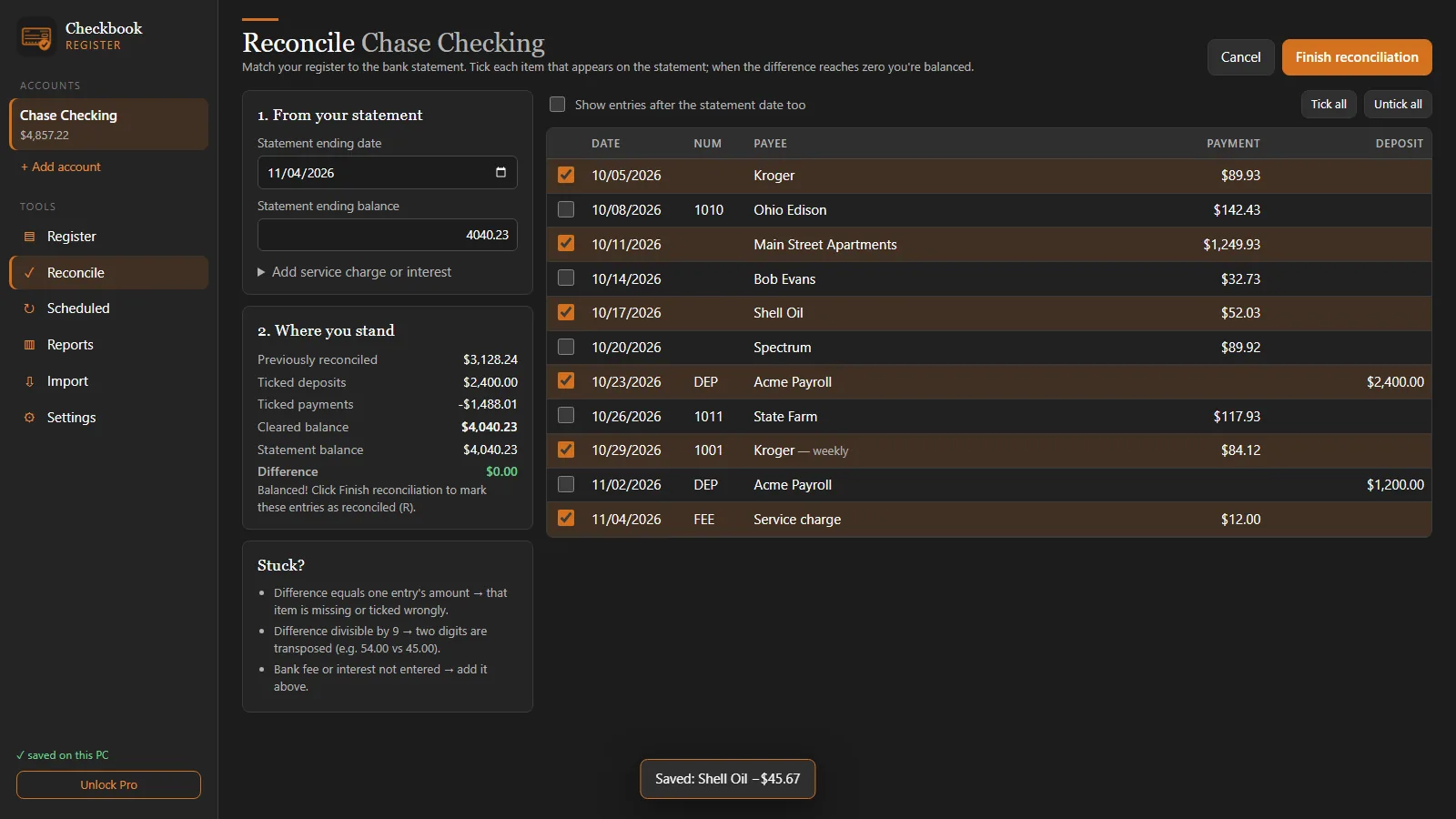
A checkbook register app does steps 4 to 7 for you. In Checkbook Register you open Reconcile, type the statement's ending balance and date, and tick each item on the statement. The app shows the cleared total and the difference live, so you can see the moment it reaches $0.00. Fees and interest can be added from the same screen, and finishing marks every ticked entry as reconciled so next month starts clean.
Want the full monthly routine? Read how to reconcile a bank statement.
Questions
How often should I balance my checkbook?
Once a month, when your bank statement arrives (or when the statement period closes in online banking). Balancing monthly keeps each session short and catches bank errors and fraud while they are still easy to dispute.
What is the difference between balancing and reconciling?
They mean the same thing for a personal checking account: comparing your own register with the bank's statement and accounting for every difference, so both arrive at the same balance.
What if the difference is divisible by 9?
A difference that divides evenly by 9 (for example $9.00, $27.00 or $0.45) usually means two digits were swapped when an amount was written down, such as $54.00 entered as $45.00.
Do I still need to balance a checkbook if I use online banking?
It is still worth doing. The bank's balance does not know about checks you have written that haven't been cashed or payments that are scheduled, so it can show more money than you actually have.